This is a very common requirement, funny that I've never used it until today. So the requirement is to send emails from my APEX application using APEX_MAIL package. For cloud deployments (especially on Autonomus Database) recommended way is to use Email Delivery service. And of course most customers would like use their own domain as the sender. So here are the steps:
Create DKIM selector in the <prefix>-<shortregioncode>-<yyyymm> format. You can find short region codes here .
Click Generate DKIM Record button, it will populate CNAME values, save these values to update your DNS records.
Until your DNS records updated, you will see it inactive.
3 Update your DNS records, add new CNAME. I am using Cloudflare but it can be OCI DNS Management as well.
Once the DNS records updated, it will become active. You can check the status using refresh button.
4 Create Approved Sender.
5 Update DNS records with Sender Policy Framework (SPF).
You can also check the SPF configuration document . It will look like this: v=spf1 include:rp.oracleemaildelivery.com include:ap.rp.oracleemaildelivery.com include:eu.rp.oracleemaildelivery.com ~all
Add a TXT record.
6 Create SMTP credentials following User >> Profile >> Saved Passwords >> SMTP credentials >> Generate Credentials. Save the values as password won't be displayed again.
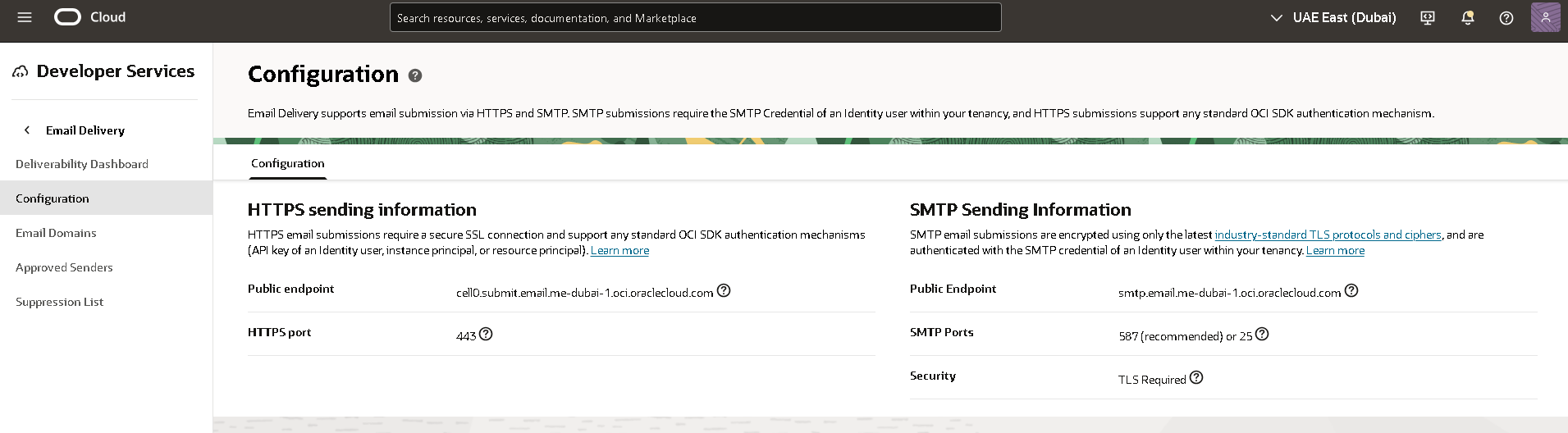
7 Get SMTP Sending Information by following Developer Sevrvices >> Email Delivery >> Configuration menu path. Copy public endpoint and port information.
8 Test sending email.
Option 1: Use APEX_MAIL
i Connect to your Autonomous Transaction Processing as ADMIN user using SQL client and configure the following SMTP parameters using APEX_INSTANCE_ADMIN.SET_PARAMETER.
ii Send a test email using APEX SQL Workshop >> SQL Commands specifying the approved sender.
There was a delay of minutes but I receieved the email.
Option 2: Use Mailx on OEL 8
i Install and configure mailx.
Then email was sent almost instantly.
Since couple of years, almost everyone is talking about AI, trying to understand how this can help, both life and business. OpenAI ChatGPT made a huge impact in our lives, "You are a helpful assistant", thank you! I am using it daily. I have been also playing around with other language models like Llama 2 and actively learning ML from different resources. Hugging Face is a must join platform along with all the material on LangChain . Just these two got me as far as I could train and run my own model to classify my emails within a week, and the results were incredibly better than I could ever expect. Besides I am enjoying this a lot.
Nowadays the number of interested customers is increasing and this post is about a very basic customer use-case, a real one: invoice entry. I know, it doesn't sound interesting, at first I thought my technical consultancy for ERP days are over, but I promise this is not boring. It has new challanges for me (and for most customers) and demonstrates application of AI services to real life problems. So let's dive into it!
Requirements
"...investigating the possibilities of automating / optimizing the reading and processing of PDF documents with the help of Optical Character Recognition (OCR)..."
The moment I saw this I could imagine what they wanted. After verifying their ideal soution in our discovery meeting, we planned for a demo to proove it can work.
Here is a mock design, on the right side we display the PDF file, OCR'ed and all values extracted, and on the left side form is populated with the extracted values. Ideally operator will just click save, and will have a chance to fill in any missing information, huge time saving.
Challenges
Biggest challange is lack of skills, customer knows APEX inside out but I am not an APEX developer. I understand the APEX environment, components and how they work, installed and configured many times. Followed and demonstrated many workshops, but never developed something from scratch. Yet APEX is low code, there are many samples and I was able to complete this in 2 days.
Development
I will briefly mention the steps I've followed and highlight the important parts. Using cloud services makes it easy to start. 1 I start with creating an Autonomous database and APEX workspace. It takes minutes to start worrking on my APEX development.
2 Then I follow this LiveLab workshop as a starter application. I tweaked the table structure according to my needs, but it gave me the foundation I needed for interacting OCI Document Understanding service using object storage is a good decision.
3 Using Document Understanding service inside APEX was easy.
I have added API endpoint in application definition.
Then I made changes to saveDocument process to invoke the AI service after uploading file to Object Storage. The below code prepares the JSON body, invokes the service processorJobs, parses return message and updates the table. The execution flow and response time is not efficient for production but good enough for a POC. I am using only Key Value Extraction feature, but you can also use all features including generation of a searchable PDF file in your output bucket. The service is pretrained and capable of identifying common key/value pairs from an invoice document. My service call creates a json file, which can be located with the job_id. I've also loaded that json file into a blob, parsed and created views on top of it just to make my life a bit easier. Chris Saxon has an excellent cheat sheat for that purpose.
4 I created a new page, with 3 regions. Two side by side, left for showing/entering extracted values, right an iframe to display PDF file, last for invoice lines, as designed in the mock wireframe.
For displaying PDF inline on the right side of the page I followed instructions in this YouTube video . The only thing is I didn't have a link item on the same page, but the ID has to come as a page parameter. So I added the link on my home page where all uploaded files are listed, and passed the document_id as page parameter. Then created a new Page Load Dynamic Action to get ID and trigger PDFViewer Action to display the file.
After changing the theme to Redwood (with some modifications to make it dark) the application looks like this:
Conclusion
APEX and AI Services is a very powerful combination, that can help you boost the productivity. Please share your ideas about what you think and of course new use-cases in the comments, maybe we can build one together!
Last week was full of excitement, you know it is that time of the year: Cloud World You can watch the recaps! Lots of announcements, new partnerships, product launches, demos, tons of interesting sessions and chance to connect with gurus, product managers and community! I didn't have the chance to be there yet, maybe next year...
One of the announcements was a container image for Autonomous database made available! It has built-in tools like Database Actions (SQL Developer Web, Performance Hub, etc.), ORDS and APEX, and Mongo API is enabled. Just the right things for developing locally without loosing anytime. Here is the offical documentation and the GitHub Page where you can find all the details.
So here is what I did to have my container running on my Windows laptop within WSL2 Ubuntu.
1We start with podman installation (you can also use docker)
2When the container runs the following ports will be exposed:
Port
Description
1521
TLS
1522
mTLS
8443
HTTPS port for ORDS / APEX and Database Actions
27017
Mongo API ( MY_ATP )
I recommend pulling the image first. Size is around 10GB and it can take a while. You can run the container with the following command.
3 Now we need to change ADMIN user password. There is a script provided for this purpose and we need to execute it by connecting to container.
4 We are ready to explore the tools already provided. Point your browser to https://localhost:8443/ords/my_atp/ and a landing page will welcome us.
5 APEX and Database Actions are also made available, no installation, no configuration, start building immediately.
6 How about connecting to database? Easy, for mTLS it requires a wallet. You can copy the wallet to any location on your local filesystem, export TNS_ADMIN then connect.
Note: You can safely skip this first part, unless you want to update your WSL2 Ubuntu. I was using a manual built experimental kernel because of a really weird debugging requirement I had in the past and I didn't need it anymore. So I needed to replace it but never had the chance or motivation, but this time it was inevitable. So writing this section as a reference for my future self.
Oracle APEX is very popular, and it is one of the most common usecases that I see with my customers. Oracle Architecture Center offers a reference architecture for this purpose: Deploy a secure production-ready Oracle Autonomous Database and Oracle APEX application . If you are comfortable with terraform or willing to learn it, I would definitely recommend using it. Even if it doesn't fit your requirements entirely it is a good starting point.
Having said that, I wanted to crack it open and see what's in it (I know typical boy's fun...), and in the end I come up with a series of blog posts while building the reference architecture piece by piece. Good for understanding what is under the hood and excellent for showing the value of terraform after doing all the work manually.
So here I start with the final architecture. I will explain the components and provide the links while doing so to help you build your own.
3For improving security posture, both database endpoint and ORDS instance is placed in a private subnet. For exposing APEX application I follow the steps in Part 3: Serving APEX in Private Subnet behind Public Load Balancer . This part is all about load balancer configuration, backend health check, SSL termination and troubleshooting connection issues. It can be helpful for any kind of load balancer / application configuration and problem solving.
4In a real life deployment, I need to find a way to access admin resources yet be able to protect them from public internet access. For this purpose, I am securing some URLs with load balancer redirect rules as load balancer sits in between as a reverse proxy. I can still access those admin resources through private subnet using Fastconnect, VPN or bastion service. These topics covered in Part 4: Securing APEX Admin Resources with Load Balancer
5Autonomous database will scale up to 3x according to CPU requirements, that is easy configuration. For the middleware part, I use metrics based auto scaling for adding ORDS instances when existing instances in the pool have 80% or more CPU utilization. I cover scaling configuration along with testing in Part 5: Autoscaling ORDS servers in private subnet behind public load balancer
I also recommend checking my colleague John Lathouwers's GitHub , he has some nice scripts.
I want to autoscale my ORDS servers based on CPU metric, so whenever the servers are busy and CPU utilized over 80% then a new node will be added to the instance pool and the backendset. You will need a loadbalancer configuration which I explained in this blog post. I have compute nodes that are running ORDS in standalone mode, you can find installation and configuration steps here .
On the compute node, I've installed java and ords and also configured to access database. Now I want to use this installation as a template for creating other nodes when I want to autoscale. Unfortunately if I use the instance as a source to my instance configuration, it will not include anything from the boot volume, but just the base image that the instance is launched from. More detail is here .
1So for that reason I will start by creating a custom image
I can use this oci cli command for the same purpose
2Then I create an instance configuration with the placement (compartment and AD) information
using my custom image which I've created in the first step
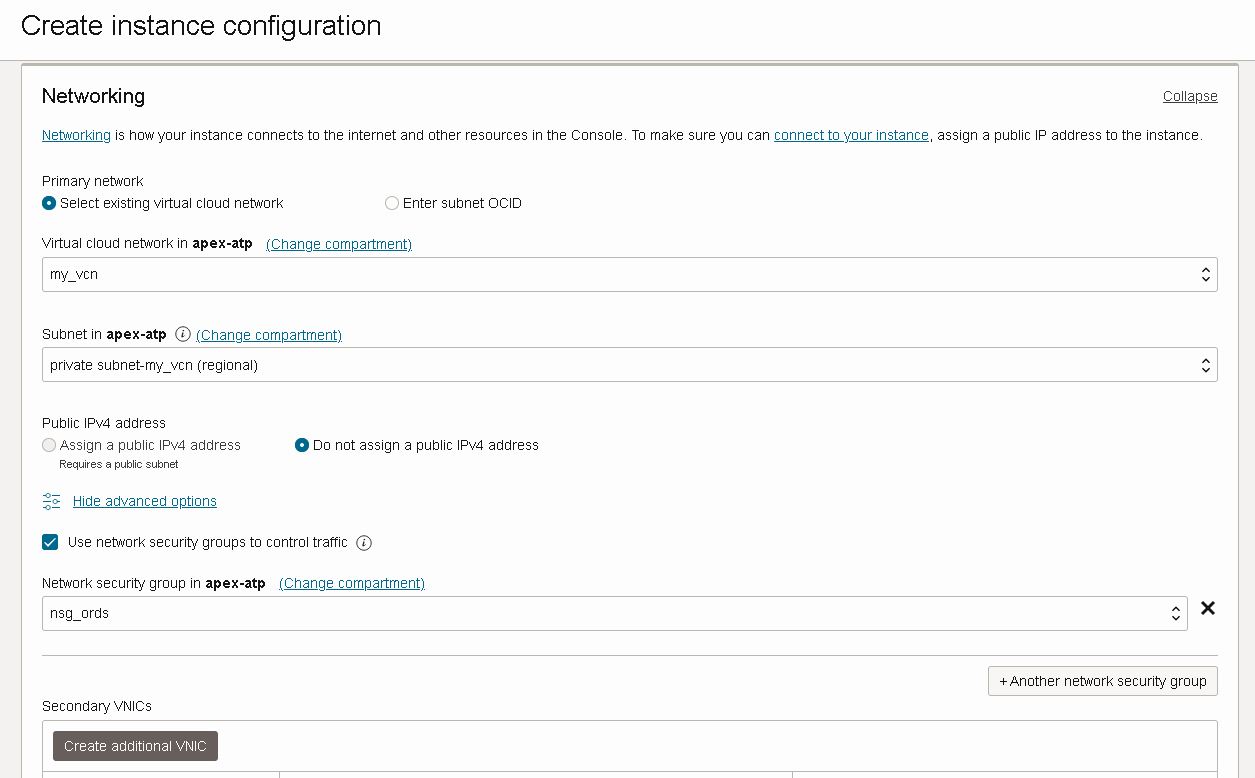
placing instance in my private subnet where all my ORDS nodes will be and attaching the network security group which will allow load balancer communication
I am adding my ssh key just in case I might need to access the servers
I also make sure that Bastion agent is enabled, plus put some piece of cloud-init script you don't see it here but it will not make a difference
I can also do the same thing with oci cli, you can find ords-instance-details file on my github
3Now I am going to create an instance pool which will create instances using the instance configuration I've just created.
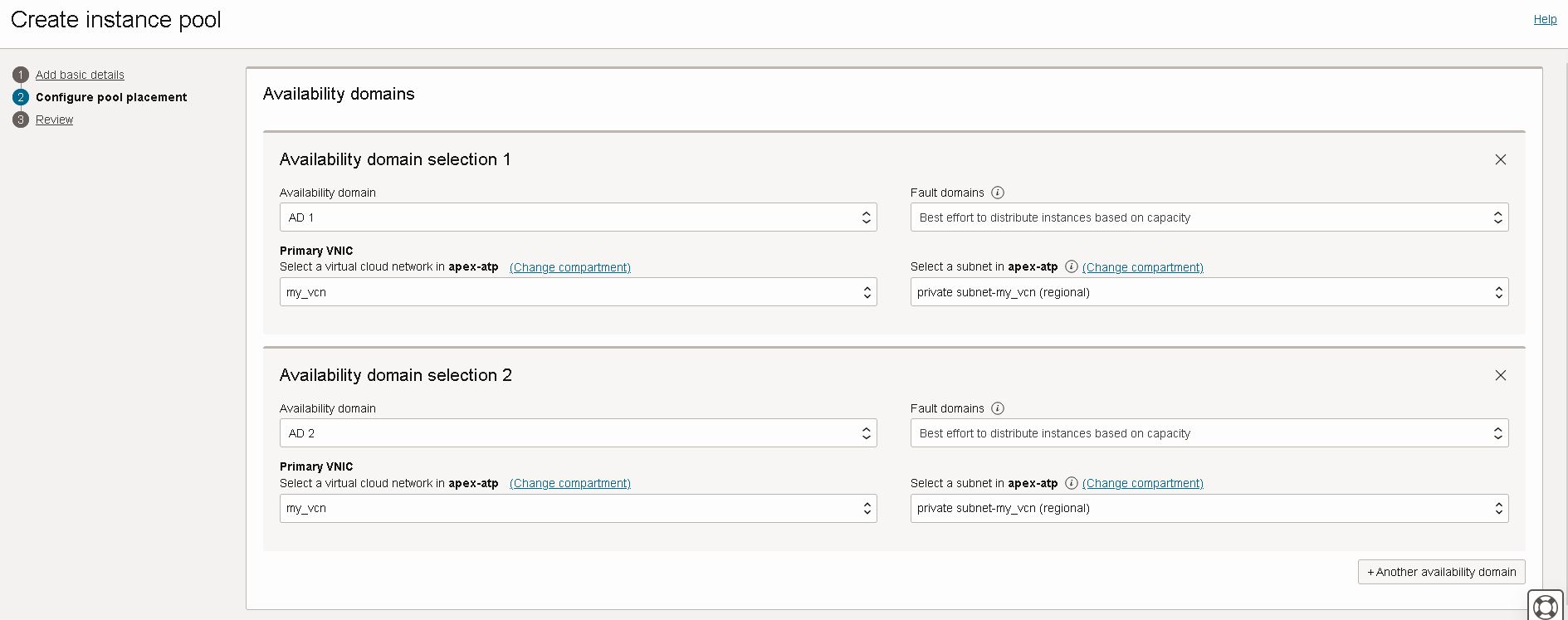
Instance pool is distrubuting instances to availability domains for risk mitigation. Note that my subnets are regional, and instance will be in private subnet
And the launched instances will be placed in load balancer backend set. I am providing port information for health check.
Here is the oci cli command that can be used for creating the same instance pool in above screenshots. You can find ords-placement-configurations.json file on my github.
4I want my instance pool to scale-out and scale-in according to CPU utilization. For that purpose I am creating an autoscaling configuration for my recently created instance pool
Instance pool will scale-out according to CPU utilization metric, if the CPU usage is above threshold it will add one instance to the pool
I want the pool shrink with a scale-in threshold that will remove one instance. I want the pool have at least 3 instance at all times and don't want the pool grow beyond 6 instances.
Here is the oci cli command to create the autoscaling configuration, you can download ords-autoscaling-policies.json file from my github.
5For testing purposes I will use the following script. Script finds all the instances in the pool, and creates some CPU load which will trigger auto scaling policy to scale out. I've made some configuration to issue commands remotely which is explained here . Base custom image has some packages already installed for stress testing, you can read about it here
So in Part 2 I've installed an ORDS instance in a private subnet. Then in Part 3 I've configured a public load balancer to serve APEX to public internet. Now I want to protect admin resources to make sure they are not exposed. For that purpose I will use Load Balancer URL redirect rules .
1Currently I can login through load balancer public IP and see database actions
2But I don't want to expose database actions and other administrator resources to public internet. So I have added following URL redirect rules to my load balancer.
3And they are working, now I can't login to database actions through load balancer, immediately redirected to apex.oracle.com as rule dictates.
4If I bypass loadbalancer and access ords instances through private network than database actions and admin resources are accessible
5I only want to serve HTTPS traffic to public internet so I create another rule set for redirecting HTTP to HTTPS
6In order to strengthen security for production deployments user names should be chosen different, ADMIN and Workspace logins should be disabled. As well as ADMIN user should be locked.
I have an Autonomous database with private endpoint, I've launched a compute instance on which I've installed java and ORDS. And configured ORDS to connect to my ATP instance. So with this part I will configure a public load balancer to serve my APEX installation
1I start with creating a public load balancer
2 My backend is serving HTTP over 8080 port, and I will do SSL termination on load balancer.
3 Load balancer will be listening to HTTPS traffic and then terminate SSL to backend
4 Once load balancer is created, I can configure backends.
Important: I prefer to add access rules manually as backend servers has network security group attached allowing traffic from/to public subnet for ports 8080/8443
5 Add Http Listener on port 80
6 Now I can configure Http to Https redirect as described here .
7 Now I edit Http Listener and Apply redirect rule I've just created
8 I create a new network security group to allow traffic towards load balancer ports 80 and 443. Then attach this NSG to load balancer.
9 Now I can test accessing it by pointing my browser to load balancer public IP. Both Http and Https protocols should work.
Troubleshooting connection issues
1 Use curl and wget to see redirects etc.
2 You can also use browser developer tools
3 I prefer using bastion service port forwarding session to access backend directly and bypass load balancer