Showing posts with label sql. Show all posts

Saturday, May 3, 2025

Sending Email with APEX_MAIL and Mailx using OCI Email Delivery

This is a very common requirement, funny that I've never used it until today. So the requirement is to send emails from my APEX application using APEX_MAIL package. For cloud deployments (especially on Autonomus Database) recommended way is to use Email Delivery service. And of course most customers would like use their own domain as the sender. So here are the steps:

1 Create email domain following Developer Services >> Email Delivery >> Email Domains >> Create Email Domain

2 Add DomainKeys Identified Mail (DKIM)

Create DKIM selector in the <prefix>-<shortregioncode>-<yyyymm> format. You can find short region codes here .
Click Generate DKIM Record button, it will populate CNAME values, save these values to update your DNS records.
Until your DNS records updated, you will see it inactive.

3 Update your DNS records, add new CNAME. I am using Cloudflare but it can be OCI DNS Management as well.

Once the DNS records updated, it will become active. You can check the status using refresh button.

4 Create Approved Sender.

5 Update DNS records with Sender Policy Framework (SPF).

You can also check the SPF configuration document . It will look like this: v=spf1 include:rp.oracleemaildelivery.com include:ap.rp.oracleemaildelivery.com include:eu.rp.oracleemaildelivery.com ~all
Add a TXT record.

6 Create SMTP credentials following User >> Profile >> Saved Passwords >> SMTP credentials >> Generate Credentials. Save the values as password won't be displayed again.

7 Get SMTP Sending Information by following Developer Sevrvices >> Email Delivery >> Configuration menu path. Copy public endpoint and port information.
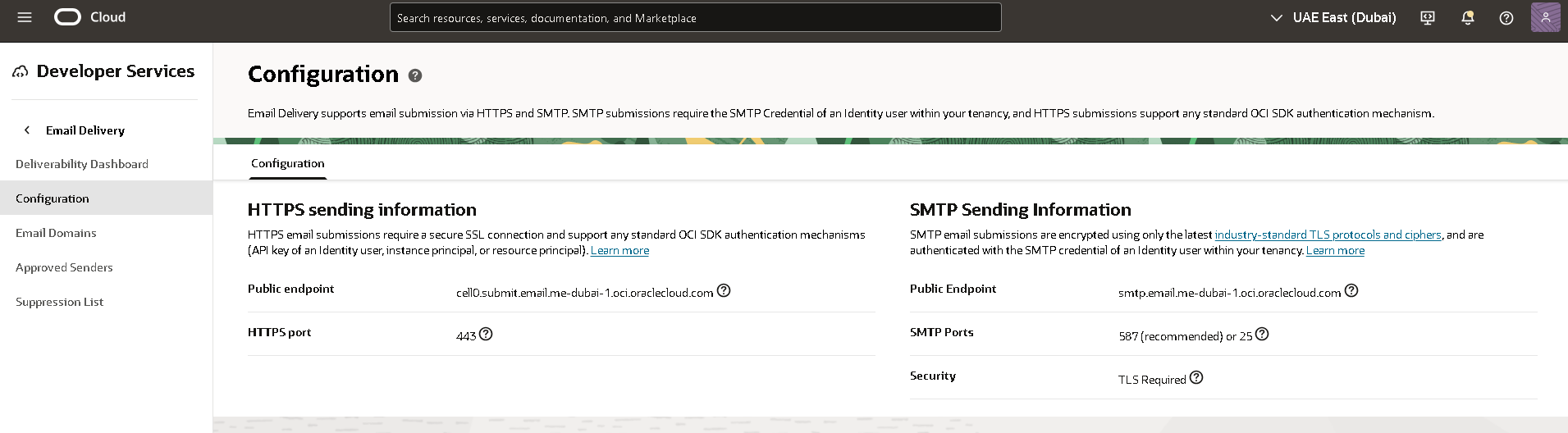
8 Test sending email.

Option 1: Use APEX_MAIL

i Connect to your Autonomous Transaction Processing as ADMIN user using SQL client and configure the following SMTP parameters using APEX_INSTANCE_ADMIN.SET_PARAMETER.

ii Send a test email using APEX SQL Workshop >> SQL Commands specifying the approved sender.

There was a delay of minutes but I receieved the email.


Option 2: Use Mailx on OEL 8

i Install and configure mailx.
Then email was sent almost instantly.


References:
1.Email Delivery Service Documentation
2.Comprehensive Guide to Testing OCI Email Delivery Monir's guide was excellent, basicaly I followed the steps in hios post
3.Integrating Oracle APEX with Email Delivery Emil Delivery service has a good documentation for integrating the service with different applications
4.APEX_MAIL Package specification
5.OCI Regions and Region Keys

Tuesday, September 5, 2023

How to discover tenancy details and self OCID with Autonomous database

Know thyself inscribed on Temple of Apollo, it is the door to true wisdom. While scripting or coding for automating a process, I often need the database to be self aware and discover information like tenancy, OCID and region etc. So here is how you can obtain details on Autonomous database

cloud_identity column contains a json formatted text containing OCIDs for tenancy, autonomous database, compartment etc. And if you are scripting/coding you will need to extract those json attributes, you can use JSON_TABLE function. This will give you nice and clean values that you can directly use.

Wednesday, May 24, 2023

Tracking Cloud Usage and Cost with Autonomous Database Using SQL

This was long time in my waiting list, "How do I track usage/cost of my cloud resources?" A very common question that I hear a lot. Let me walk through the options I know:

1 I can use cost analysis tool. It is very handy for visualizations, I can add filters, change grouping dimensions. I can have daily and monthly reports including forecast for the interested period. I can also save my reports, download report output in different formats. I can even schedule reports and it will be created under a bucket. Down sides are: it is built for visual consumption, extracting data is manual, I can't go beyond one year.

2 I can use cost and usage reports. They are csv files generated every six hours in an Oracle owned bucket but can be accessed with some cross tenancy configuration. These files are retained for one year. See official documentation for details. I need to find other tools to import and analyze data in csv files. Here is a really good example for this purpose.

3 I can also use the REST API to get a Usage Summary. Similar is also available in cli. Depending on the requirement this might be a good fit, but most of the time it is too much for most of the customers.

4 I can configure an Autonomous Database and use it to Track Oracle Cloud Infrastructure Resources, Cost and Usage Reports with Autonomous Database Views . I am going to focus on this because with minimal effort it can deliver great value. I can query data with simple sql, integrate it into any reporting or monitoring tool and I can go beyond one year limit by storing csv report data inside my database. Here I will list steps and some sample scripts:

a There are some prerequsite steps that need to be completed. You can check official documentation or my other blog post where I discuss resource principals to access OCI resources.

Note:The resource principal token is cached for two hours. Therefore, if you change the policy or the dynamic group, you have to wait for two hours to see the effect of your changes. This note is from documentation .

b Once the policies and resource principals are in place, I can use resourse views. There are multiple views but I am interested in two of them: OCI_COST_DATA and OCI_USAGE_DATA. I didn't check the source but I am guessing PIPELINED functions and/or external tables are involved. I could just use the views but there are two problems I need to solve: running query on the view is slow, and underlying data is changing, data older than one year will vanish. For this reason I am going to create a materialized view based on an existing table. This temporary table will be refreshed every 6 hours and in an another table I will be accumulating all the data. I am creating primary keys to detect the difference for each run.

c I am creating a procedure which will refresh the temp table with latest data, merge new rows into actual table, then schedule the next run.

d I just need to execute the procedure once, then the ball will be rolling on its own.

e DBMS_SCHEDULER job details can be tracked with the following views.

f Finally I will have all the data accumulated in my table, even long after the csv usage/cost files are deleted. Here are some SQL queries to start with.

Featured

Putting it altogether: How to deploy scalable and secure APEX on OCI

Oracle APEX is very popular, and it is one of the most common usecases that I see with my customers. Oracle Architecture Center offers a re...