Showing posts with label autoscaling. Show all posts

Wednesday, May 17, 2023

Putting it altogether: How to deploy scalable and secure APEX on OCI

Oracle APEX is very popular, and it is one of the most common usecases that I see with my customers. Oracle Architecture Center offers a reference architecture for this purpose: Deploy a secure production-ready Oracle Autonomous Database and Oracle APEX application . If you are comfortable with terraform or willing to learn it, I would definitely recommend using it. Even if it doesn't fit your requirements entirely it is a good starting point.

Having said that, I wanted to crack it open and see what's in it (I know typical boy's fun...), and in the end I come up with a series of blog posts while building the reference architecture piece by piece. Good for understanding what is under the hood and excellent for showing the value of terraform after doing all the work manually.

So here I start with the final architecture. I will explain the components and provide the links while doing so to help you build your own.

Quick links to the posts in the series

Part 1: Accessing Autonomous Database over Private Endpoint using SQL Developer
Part 2: Installing Customer Managed ORDS on Compute Instance for Autonomous Database
Part 3: Serving APEX in Private Subnet behind Public Load Balancer
Part 4: Securing APEX Admin Resources with Load Balancer
Part 5: Autoscaling ORDS servers in private subnet behind public load balancer

1Backbone of everything is Oracle database for APEX applications. I have an Autonomous database instance with Transaction processing workload type with autoscaling enabled. It is deployed with a Private Endpoint in a private subnet. You can check official documentation for creating one. For accessing your ATP instance you can see Part 1: Accessing Autonomous Database over Private Endpoint using SQL Developer

2Although ATP comes with Oracle managed ORDS, I want to install my own ORDS server on compute vm. In Part 2: Installing Customer Managed ORDS on Compute Instance for Autonomous Database I install and configure java and ORDS, also do the required networking configuration.

3For improving security posture, both database endpoint and ORDS instance is placed in a private subnet. For exposing APEX application I follow the steps in Part 3: Serving APEX in Private Subnet behind Public Load Balancer . This part is all about load balancer configuration, backend health check, SSL termination and troubleshooting connection issues. It can be helpful for any kind of load balancer / application configuration and problem solving.

4In a real life deployment, I need to find a way to access admin resources yet be able to protect them from public internet access. For this purpose, I am securing some URLs with load balancer redirect rules as load balancer sits in between as a reverse proxy. I can still access those admin resources through private subnet using Fastconnect, VPN or bastion service. These topics covered in Part 4: Securing APEX Admin Resources with Load Balancer

5Autonomous database will scale up to 3x according to CPU requirements, that is easy configuration. For the middleware part, I use metrics based auto scaling for adding ORDS instances when existing instances in the pool have 80% or more CPU utilization. I cover scaling configuration along with testing in Part 5: Autoscaling ORDS servers in private subnet behind public load balancer

I also recommend checking my colleague John Lathouwers's GitHub , he has some nice scripts.

Thursday, May 11, 2023

Part 5: Autoscaling ORDS servers in private subnet behind public load balancer

I want to autoscale my ORDS servers based on CPU metric, so whenever the servers are busy and CPU utilized over 80% then a new node will be added to the instance pool and the backendset. You will need a loadbalancer configuration which I explained in this blog post. I have compute nodes that are running ORDS in standalone mode, you can find installation and configuration steps here .

On the compute node, I've installed java and ords and also configured to access database. Now I want to use this installation as a template for creating other nodes when I want to autoscale. Unfortunately if I use the instance as a source to my instance configuration, it will not include anything from the boot volume, but just the base image that the instance is launched from. More detail is here .

1So for that reason I will start by creating a custom image

I can use this oci cli command for the same purpose


2Then I create an instance configuration with the placement (compartment and AD) information

using my custom image which I've created in the first step

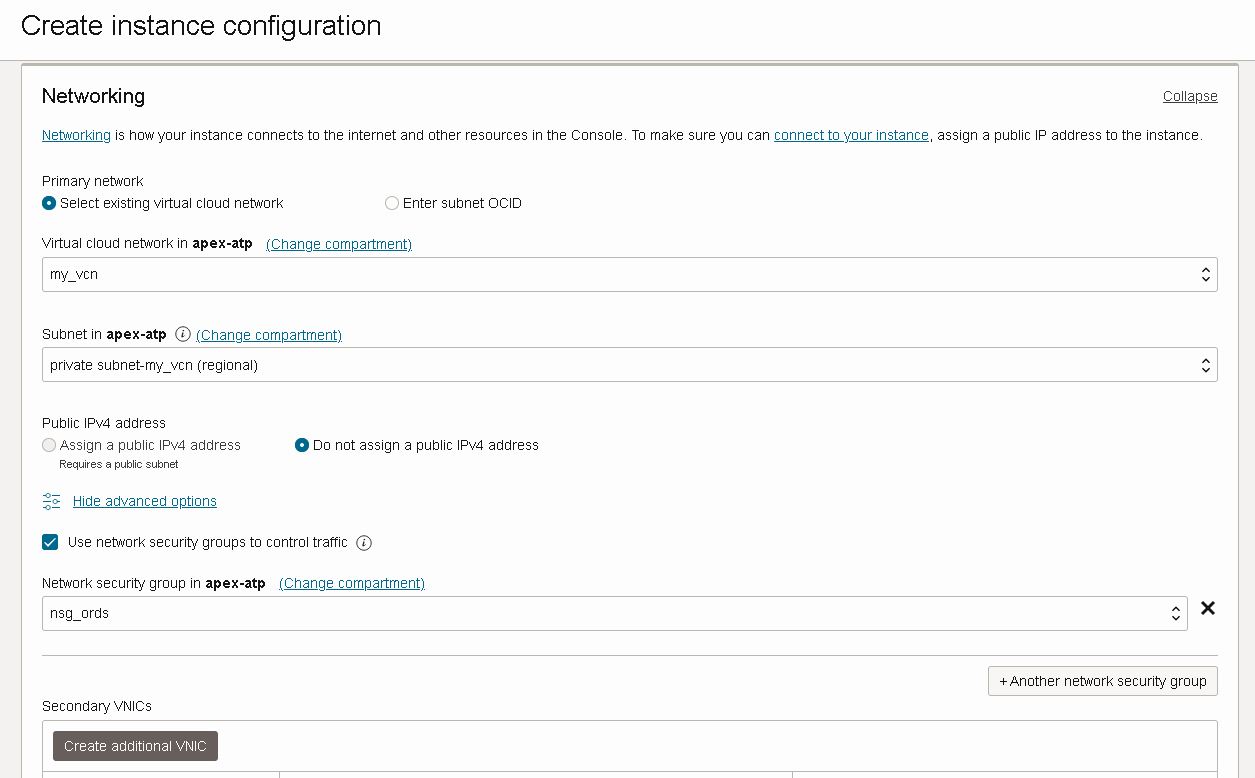
placing instance in my private subnet where all my ORDS nodes will be and attaching the network security group which will allow load balancer communication

I am adding my ssh key just in case I might need to access the servers

I also make sure that Bastion agent is enabled, plus put some piece of cloud-init script you don't see it here but it will not make a difference

I can also do the same thing with oci cli, you can find ords-instance-details file on my github


3Now I am going to create an instance pool which will create instances using the instance configuration I've just created.

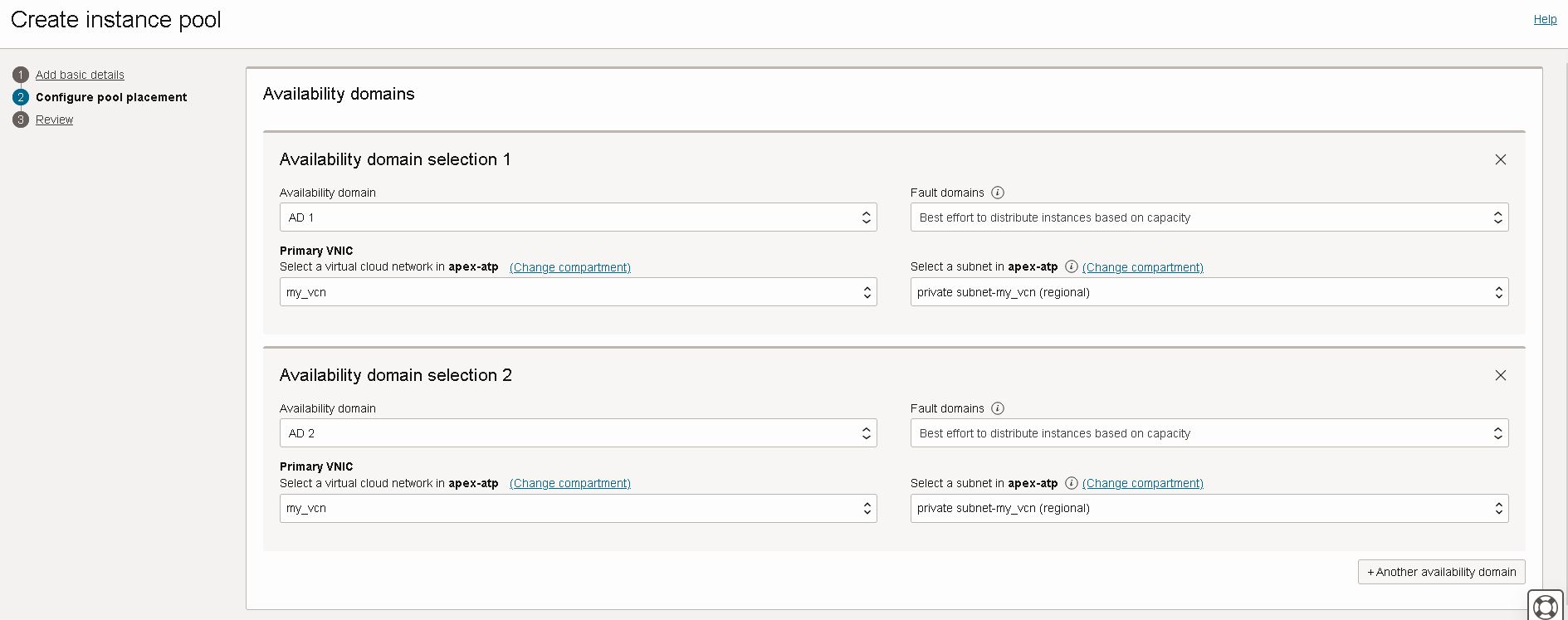
Instance pool is distrubuting instances to availability domains for risk mitigation. Note that my subnets are regional, and instance will be in private subnet

And the launched instances will be placed in load balancer backend set. I am providing port information for health check.

Here is the oci cli command that can be used for creating the same instance pool in above screenshots. You can find ords-placement-configurations.json file on my github.


4I want my instance pool to scale-out and scale-in according to CPU utilization. For that purpose I am creating an autoscaling configuration for my recently created instance pool

Instance pool will scale-out according to CPU utilization metric, if the CPU usage is above threshold it will add one instance to the pool

I want the pool shrink with a scale-in threshold that will remove one instance. I want the pool have at least 3 instance at all times and don't want the pool grow beyond 6 instances.

Here is the oci cli command to create the autoscaling configuration, you can download ords-autoscaling-policies.json file from my github.


5For testing purposes I will use the following script. Script finds all the instances in the pool, and creates some CPU load which will trigger auto scaling policy to scale out. I've made some configuration to issue commands remotely which is explained here . Base custom image has some packages already installed for stress testing, you can read about it here

Wednesday, May 3, 2023

Stress test on OCI compute instance with stress-ng

I needed to create a CPU load on compute instances to test metrics based auto scaling.

1I have Oracle Linux 8 image as base image. So this is what I have done. First add repository and install pakages.

2After installing the stress-ng , I can push some load on CPU

3Console also displays the CPU utilization is increased

Featured

Putting it altogether: How to deploy scalable and secure APEX on OCI

Oracle APEX is very popular, and it is one of the most common usecases that I see with my customers. Oracle Architecture Center offers a re...