Showing posts with label bastion service. Show all posts

Friday, December 26, 2025

VNC Console Connection from Windows to Oracle Cloud Virtual Machine Instance

I generallay use cloud shell for console connections, but recently for bringing an image to OCI, troubleshoot and complete the installation I needed serial connection. I am using Windows with WSL, and most of my customers also prefer Windows, so I thought this will be good idea to take note of the steps for future myself as well as customers. This is based on my colleague Florian's Git Post which was brought to my attention by Kenan, another colleague when I needed most, thanks to bot of them! So here we go:

Steps

1 Download and unzip Portable Git Bash I prefer portable one, you can also install it with right click context menu integration. This will give us ssh in Windows without going into Powershell details.

2 Download a VNC Viewer, I prefer TigerVNC as it doesn't require any installation.

3 Create a console connection to the instance:

  • Go to OCI Console and Compute
  • Find your instance and click on the name
  • Go to OS Management tab and scroll down to Console Connections
  • Click Create local connection
  • You can use OCI generated ssh keys, or bring your own key.

You can use compute instance-connection create cli command.

4 Copy VNC connection string for Linux/Mac


You can use compute instance-connection list cli command by filtering only ACTIVE connections.

5 We will update the command to use SSH key for authentication
After adding -i ~/.ssh/jump-server.key -o HostKeyAlgorithms=+ssh-rsa -o PubkeyAcceptedKeyTypes=+ssh-rsa to the script and it will look like this

6 Run the script in git bash

7 Connect using VNC Viewer to VNC server at localhost:5900


Some usefull scripts

Find all RUNNING instances in $compartment_id where instance name like 'qradar':

Find all ACTIVE console connection for particular $compute_instance_ocid:

Generic script without OCI CLI dependency with minimum input:

All in one script which finds compute instance, creates console connection and start SSH port forwarding for VNC serial connection :

Tuesday, April 25, 2023

How to access Oracle base database in private subnet using bastion service

Here I have an Oracle database in a private subnet.

1For quickly accessing my database I am using bastion service and port forwarding sessions. This way I don't need to worry about the bastion host security as it is taken care of by Oracle. First I create the bastion. As I will be joining from public internet I don't put any IP/CIDR restrictions.

It can also be created with the following oci cli command

2Then for accessing database on port 1521, I am creating a port forwarding session

Here is the command for port forwarding session with oci cli

I can create managed SSH session for root access. Or creating a port forwarding session on 22 and ssh'ing into localhost can also do the same thing.

3Once the session is created I copy the command, now I need to provide my ssh key and local port 10521 this time

4Now the tunnel is up, and I can connect to database using service name that I find on console. It can be CDB or PDB.

5For SQL*PLus connection string can be formed with many different connect identifiers, here I use the simplest.

Wednesday, April 19, 2023

Part 4: Securing APEX Admin Resources with Load Balancer

So in Part 2 I've installed an ORDS instance in a private subnet. Then in Part 3 I've configured a public load balancer to serve APEX to public internet. Now I want to protect admin resources to make sure they are not exposed. For that purpose I will use Load Balancer URL redirect rules .

1Currently I can login through load balancer public IP and see database actions

2But I don't want to expose database actions and other administrator resources to public internet. So I have added following URL redirect rules to my load balancer.

3And they are working, now I can't login to database actions through load balancer, immediately redirected to apex.oracle.com as rule dictates.

4If I bypass loadbalancer and access ords instances through private network than database actions and admin resources are accessible

5I only want to serve HTTPS traffic to public internet so I create another rule set for redirecting HTTP to HTTPS

6In order to strengthen security for production deployments user names should be chosen different, ADMIN and Workspace logins should be disabled. As well as ADMIN user should be locked.

Thursday, April 13, 2023

Part 2: Installing Customer Managed ORDS on Compute Instance for Autonomous Database

For running your own ORDS instance, follow steps here

1 Create a Network Security Group for your instance, allow ingress traffic to 8080 and 8443 ports from private subnet. Also allow egress traffic. We will test the installation using bastion service.

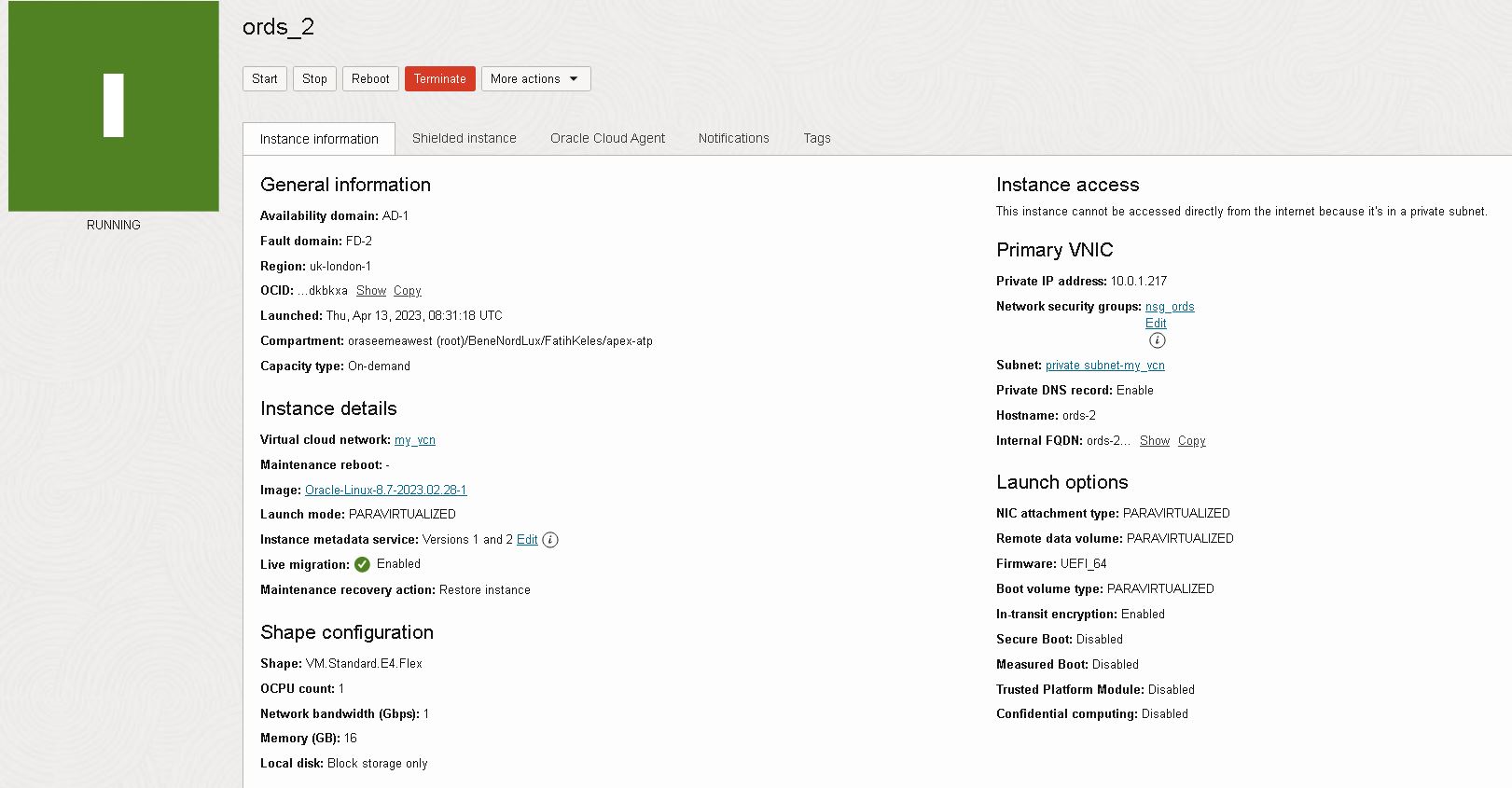
2 Launch an instance in your private subnet. I preferred Oracle Linux 8 with VM.Standard.E4.Flex shape. Also enable Bastion service under Advances options > Oracle Cloud Agent

3 Attach NSG created in step 1.

4 Create a bastion service in the same private subnet and then create a managed SSH session to connect to instance.

5 Connect to instance and do following yum updates and installations with root user.

6 Create following folders and upload your Autonomous Database Wallet to config folder

Note: You can use use scp in combination with bastion session to copy your local file

7Install using ords interactive command line, refer to documentation for options

Note: I've enabled all features, you can choose None for production deployments

Note: I've preffered to serve ORDS over port 8080 using HTTP, as I plan to put a loadbalancer infront of the VM and serve HTTPS thus offloading SSL

8If you see the following CORS error message:

Login to ORDS instance, then edit /etc/ords/config/global/settings.xml to add the following entry:

9Open ports 8080 and 8443 on local firewall

10Enable ORDS service, surviving restarts

11Create a bastion port forwarding session

12Start local port forwarding session

13Test pointing your browser to localhost:8080

Tuesday, April 11, 2023

Part 1: Accessing Autonomous Database over Private Endpoint using SQL Developer

With autonomous database you can choose between different network access types:

When you choose a deployment with private endpoint , here is how you can connect to your ADB instance from your local machine by using Bastion Service and port forwarding sessions.

1Create a network security group, allow ingress traffic to ports 1521 (TLS), 1522 (mTLS) and 443 (Oracle APEX, Database Actions, and Oracle REST Data Services) from your private subnet CIDR where your bastion host will be, allow egress traffic as well. Attach it to your database.They should look similar to this:

2Create a bastion in the same subnet as your database private endpoint. Then create a port forwarding session using your database private IP and port

3Copy SSH command, choose a local port and start port forwarding session. I generally use 10522, to avoid conflict.

4Download ADB wallet, unzip it. Add an entry to tnsnames.ora file similar to below one, pointing to local port which will be forwarded to private endpoint by bastion host. Then zip the folder to use with sql developer.

5Use your choice of database client to connect. With sqldeveloper it should look something like this:

Featured

Putting it altogether: How to deploy scalable and secure APEX on OCI

Oracle APEX is very popular, and it is one of the most common usecases that I see with my customers. Oracle Architecture Center offers a re...