Showing posts with label ORDS. Show all posts

Friday, September 22, 2023

Run Autonomous Database, ORDS and APEX on your laptop with single command!

Last week was full of excitement, you know it is that time of the year: Cloud World You can watch the recaps! Lots of announcements, new partnerships, product launches, demos, tons of interesting sessions and chance to connect with gurus, product managers and community! I didn't have the chance to be there yet, maybe next year...

One of the announcements was a container image for Autonomous database made available! It has built-in tools like Database Actions (SQL Developer Web, Performance Hub, etc.), ORDS and APEX, and Mongo API is enabled. Just the right things for developing locally without loosing anytime. Here is the offical documentation and the GitHub Page where you can find all the details.

So here is what I did to have my container running on my Windows laptop within WSL2 Ubuntu.

1We start with podman installation (you can also use docker)

2When the container runs the following ports will be exposed:

Port Description
1521 TLS
1522 mTLS
8443 HTTPS port for ORDS / APEX and Database Actions
27017 Mongo API ( MY_ATP )
I recommend pulling the image first. Size is around 10GB and it can take a while. You can run the container with the following command.

3 Now we need to change ADMIN user password. There is a script provided for this purpose and we need to execute it by connecting to container.

4 We are ready to explore the tools already provided. Point your browser to https://localhost:8443/ords/my_atp/ and a landing page will welcome us.

5 APEX and Database Actions are also made available, no installation, no configuration, start building immediately.

6 How about connecting to database? Easy, for mTLS it requires a wallet. You can copy the wallet to any location on your local filesystem, export TNS_ADMIN then connect.


Note: You can safely skip this first part, unless you want to update your WSL2 Ubuntu. I was using a manual built experimental kernel because of a really weird debugging requirement I had in the past and I didn't need it anymore. So I needed to replace it but never had the chance or motivation, but this time it was inevitable. So writing this section as a reference for my future self.


References:
1. ADB Free GitHub Page: https://github.com/oracle/adb-free
2. Podman Documentation: https://podman.io/docs/installation
3. Instal Docker on WSL2: https://nickjanetakis.com/blog/install-docker-in-wsl-2-without-do...
4. Autostart Docker Daemon: https://blog.nillsf.com/index.php/2020/06/29/how-to-autom...
5. Upgrade Ubuntu: https://askubuntu.com/questions/1428423/upgrade-ubuntu-in-wsl...
6. Reboot Ubuntu: https://superuser.com/questions/1126721/rebooting-ubuntu-o...

Wednesday, May 17, 2023

Putting it altogether: How to deploy scalable and secure APEX on OCI

Oracle APEX is very popular, and it is one of the most common usecases that I see with my customers. Oracle Architecture Center offers a reference architecture for this purpose: Deploy a secure production-ready Oracle Autonomous Database and Oracle APEX application . If you are comfortable with terraform or willing to learn it, I would definitely recommend using it. Even if it doesn't fit your requirements entirely it is a good starting point.

Having said that, I wanted to crack it open and see what's in it (I know typical boy's fun...), and in the end I come up with a series of blog posts while building the reference architecture piece by piece. Good for understanding what is under the hood and excellent for showing the value of terraform after doing all the work manually.

So here I start with the final architecture. I will explain the components and provide the links while doing so to help you build your own.

Quick links to the posts in the series

Part 1: Accessing Autonomous Database over Private Endpoint using SQL Developer
Part 2: Installing Customer Managed ORDS on Compute Instance for Autonomous Database
Part 3: Serving APEX in Private Subnet behind Public Load Balancer
Part 4: Securing APEX Admin Resources with Load Balancer
Part 5: Autoscaling ORDS servers in private subnet behind public load balancer

1Backbone of everything is Oracle database for APEX applications. I have an Autonomous database instance with Transaction processing workload type with autoscaling enabled. It is deployed with a Private Endpoint in a private subnet. You can check official documentation for creating one. For accessing your ATP instance you can see Part 1: Accessing Autonomous Database over Private Endpoint using SQL Developer

2Although ATP comes with Oracle managed ORDS, I want to install my own ORDS server on compute vm. In Part 2: Installing Customer Managed ORDS on Compute Instance for Autonomous Database I install and configure java and ORDS, also do the required networking configuration.

3For improving security posture, both database endpoint and ORDS instance is placed in a private subnet. For exposing APEX application I follow the steps in Part 3: Serving APEX in Private Subnet behind Public Load Balancer . This part is all about load balancer configuration, backend health check, SSL termination and troubleshooting connection issues. It can be helpful for any kind of load balancer / application configuration and problem solving.

4In a real life deployment, I need to find a way to access admin resources yet be able to protect them from public internet access. For this purpose, I am securing some URLs with load balancer redirect rules as load balancer sits in between as a reverse proxy. I can still access those admin resources through private subnet using Fastconnect, VPN or bastion service. These topics covered in Part 4: Securing APEX Admin Resources with Load Balancer

5Autonomous database will scale up to 3x according to CPU requirements, that is easy configuration. For the middleware part, I use metrics based auto scaling for adding ORDS instances when existing instances in the pool have 80% or more CPU utilization. I cover scaling configuration along with testing in Part 5: Autoscaling ORDS servers in private subnet behind public load balancer

I also recommend checking my colleague John Lathouwers's GitHub , he has some nice scripts.

Thursday, May 11, 2023

Part 5: Autoscaling ORDS servers in private subnet behind public load balancer

I want to autoscale my ORDS servers based on CPU metric, so whenever the servers are busy and CPU utilized over 80% then a new node will be added to the instance pool and the backendset. You will need a loadbalancer configuration which I explained in this blog post. I have compute nodes that are running ORDS in standalone mode, you can find installation and configuration steps here .

On the compute node, I've installed java and ords and also configured to access database. Now I want to use this installation as a template for creating other nodes when I want to autoscale. Unfortunately if I use the instance as a source to my instance configuration, it will not include anything from the boot volume, but just the base image that the instance is launched from. More detail is here .

1So for that reason I will start by creating a custom image

I can use this oci cli command for the same purpose


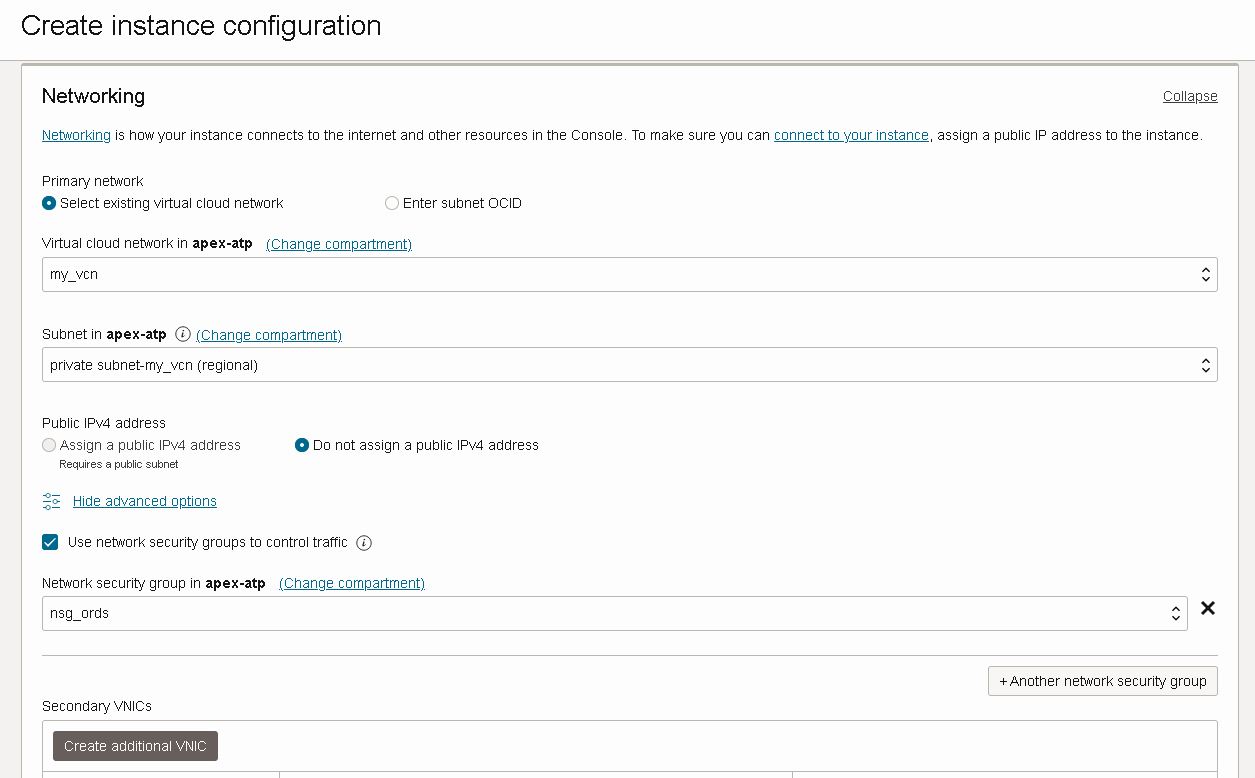
2Then I create an instance configuration with the placement (compartment and AD) information

using my custom image which I've created in the first step

placing instance in my private subnet where all my ORDS nodes will be and attaching the network security group which will allow load balancer communication

I am adding my ssh key just in case I might need to access the servers

I also make sure that Bastion agent is enabled, plus put some piece of cloud-init script you don't see it here but it will not make a difference

I can also do the same thing with oci cli, you can find ords-instance-details file on my github


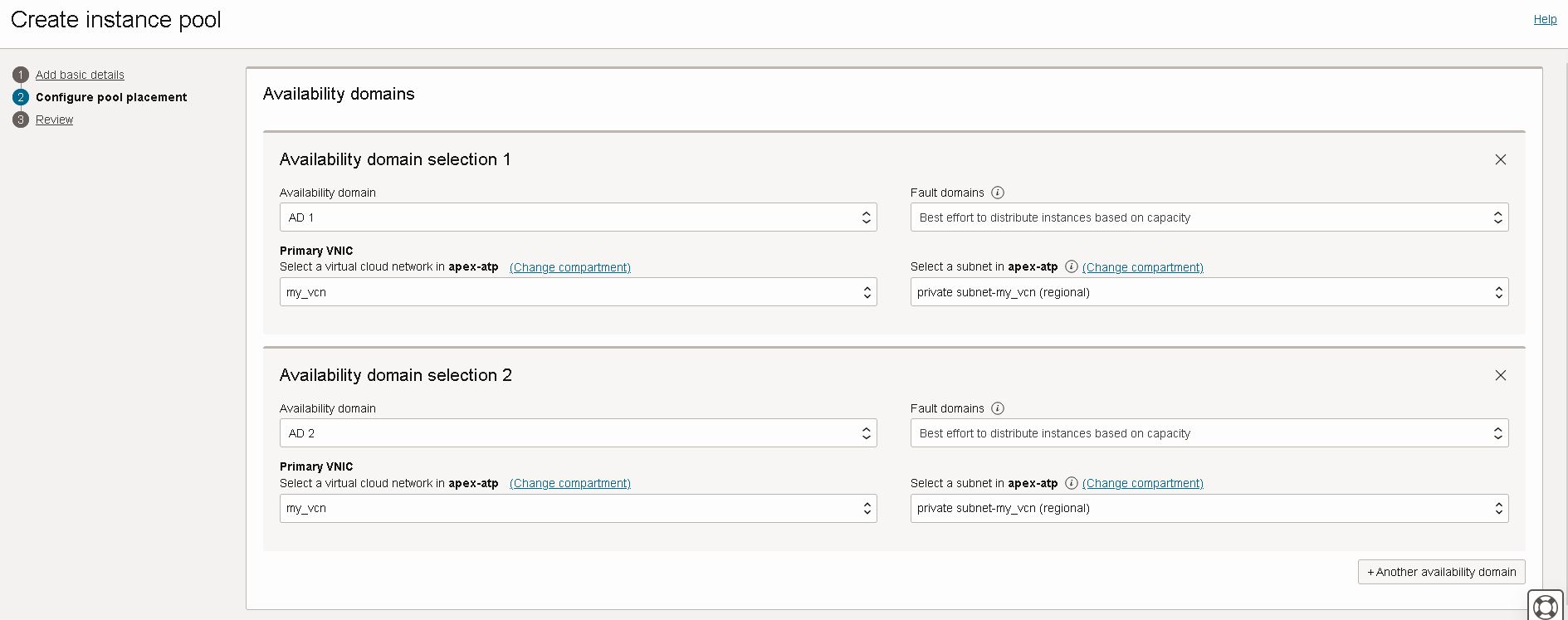
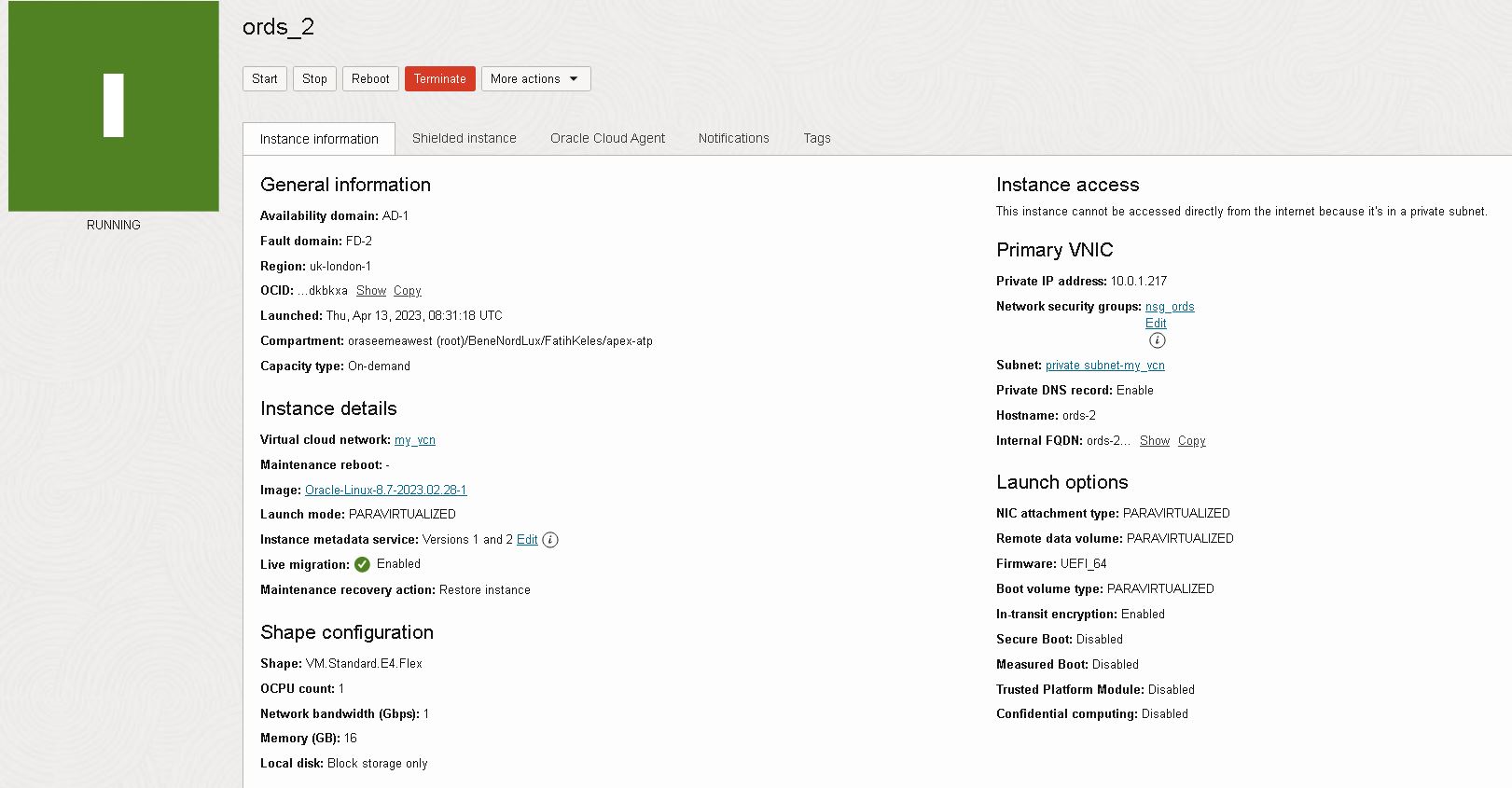
3Now I am going to create an instance pool which will create instances using the instance configuration I've just created.

Instance pool is distrubuting instances to availability domains for risk mitigation. Note that my subnets are regional, and instance will be in private subnet

And the launched instances will be placed in load balancer backend set. I am providing port information for health check.

Here is the oci cli command that can be used for creating the same instance pool in above screenshots. You can find ords-placement-configurations.json file on my github.


4I want my instance pool to scale-out and scale-in according to CPU utilization. For that purpose I am creating an autoscaling configuration for my recently created instance pool

Instance pool will scale-out according to CPU utilization metric, if the CPU usage is above threshold it will add one instance to the pool

I want the pool shrink with a scale-in threshold that will remove one instance. I want the pool have at least 3 instance at all times and don't want the pool grow beyond 6 instances.

Here is the oci cli command to create the autoscaling configuration, you can download ords-autoscaling-policies.json file from my github.


5For testing purposes I will use the following script. Script finds all the instances in the pool, and creates some CPU load which will trigger auto scaling policy to scale out. I've made some configuration to issue commands remotely which is explained here . Base custom image has some packages already installed for stress testing, you can read about it here

Wednesday, April 19, 2023

Part 4: Securing APEX Admin Resources with Load Balancer

So in Part 2 I've installed an ORDS instance in a private subnet. Then in Part 3 I've configured a public load balancer to serve APEX to public internet. Now I want to protect admin resources to make sure they are not exposed. For that purpose I will use Load Balancer URL redirect rules .

1Currently I can login through load balancer public IP and see database actions

2But I don't want to expose database actions and other administrator resources to public internet. So I have added following URL redirect rules to my load balancer.

3And they are working, now I can't login to database actions through load balancer, immediately redirected to apex.oracle.com as rule dictates.

4If I bypass loadbalancer and access ords instances through private network than database actions and admin resources are accessible

5I only want to serve HTTPS traffic to public internet so I create another rule set for redirecting HTTP to HTTPS

6In order to strengthen security for production deployments user names should be chosen different, ADMIN and Workspace logins should be disabled. As well as ADMIN user should be locked.

Tuesday, April 18, 2023

Part 3: Serving APEX in Private Subnet behind Public Load Balancer

I have an Autonomous database with private endpoint, I've launched a compute instance on which I've installed java and ORDS. And configured ORDS to connect to my ATP instance. So with this part I will configure a public load balancer to serve my APEX installation

1I start with creating a public load balancer

2 My backend is serving HTTP over 8080 port, and I will do SSL termination on load balancer.

3 Load balancer will be listening to HTTPS traffic and then terminate SSL to backend

4 Once load balancer is created, I can configure backends.

Important: I prefer to add access rules manually as backend servers has network security group attached allowing traffic from/to public subnet for ports 8080/8443

5 Add Http Listener on port 80

6 Now I can configure Http to Https redirect as described here .

7 Now I edit Http Listener and Apply redirect rule I've just created

8 I create a new network security group to allow traffic towards load balancer ports 80 and 443. Then attach this NSG to load balancer.

9 Now I can test accessing it by pointing my browser to load balancer public IP. Both Http and Https protocols should work.

Troubleshooting connection issues

1 Use curl and wget to see redirects etc.

2 You can also use browser developer tools

3 I prefer using bastion service port forwarding session to access backend directly and bypass load balancer

Thursday, April 13, 2023

Part 2: Installing Customer Managed ORDS on Compute Instance for Autonomous Database

For running your own ORDS instance, follow steps here

1 Create a Network Security Group for your instance, allow ingress traffic to 8080 and 8443 ports from private subnet. Also allow egress traffic. We will test the installation using bastion service.

2 Launch an instance in your private subnet. I preferred Oracle Linux 8 with VM.Standard.E4.Flex shape. Also enable Bastion service under Advances options > Oracle Cloud Agent

3 Attach NSG created in step 1.

4 Create a bastion service in the same private subnet and then create a managed SSH session to connect to instance.

5 Connect to instance and do following yum updates and installations with root user.

6 Create following folders and upload your Autonomous Database Wallet to config folder

Note: You can use use scp in combination with bastion session to copy your local file

7Install using ords interactive command line, refer to documentation for options

Note: I've enabled all features, you can choose None for production deployments

Note: I've preffered to serve ORDS over port 8080 using HTTP, as I plan to put a loadbalancer infront of the VM and serve HTTPS thus offloading SSL

8If you see the following CORS error message:

Login to ORDS instance, then edit /etc/ords/config/global/settings.xml to add the following entry:

9Open ports 8080 and 8443 on local firewall

10Enable ORDS service, surviving restarts

11Create a bastion port forwarding session

12Start local port forwarding session

13Test pointing your browser to localhost:8080

Featured

Putting it altogether: How to deploy scalable and secure APEX on OCI

Oracle APEX is very popular, and it is one of the most common usecases that I see with my customers. Oracle Architecture Center offers a re...